



How to Use AI for Meeting Notes and Insights
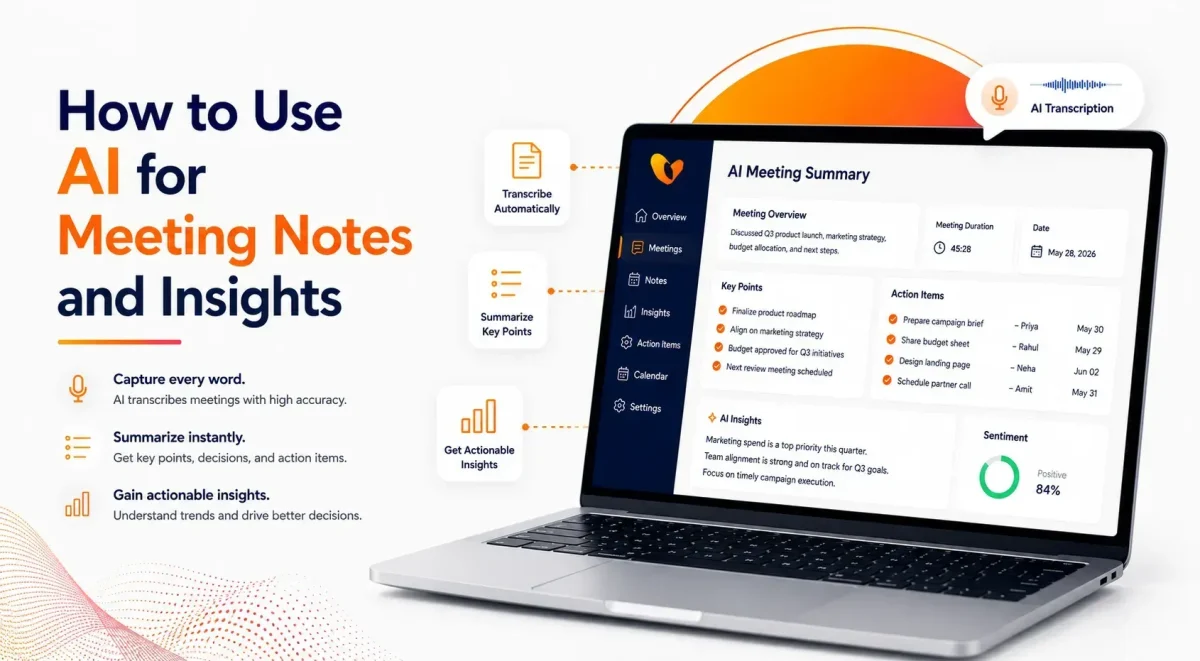

Table of Contents
The meeting ends. Everyone returns to work. Then the follow-up messages begin.
Who agreed to contact the client? Was the launch date confirmed or only discussed? Which issue needs another review? The people in the room may remember the conversation differently, while anyone who missed it has to depend on a rushed recap. In this process, the key issues that mattered the most can be lost, ultimately leading to client dissatisfaction.
This is where an AI meeting assistant becomes useful. It can turn a recorded conversation into a transcript, meeting summary, list of decisions, and assigned follow-up tasks. More advanced tools also reveal patterns in participation, customer concerns, and recurring discussion topics.
Used well, AI does not simply save someone from taking notes. It gives the business a clearer record of what happened and what must happen next.
What Does AI Actually Do During a Meeting?
An AI note taker listens to the recorded conversation and converts speech into text. It then analyzes the transcript to identify the parts most likely to matter after the call, such as deadlines, decisions, questions, names, and responsibilities.
The output may include:
- A full transcript with speaker labels
- A short meeting recap
- Key discussion points
- Decisions made
- Action items and owners
- Timestamps for important moments
- Participation and engagement data
Vitel Meet supports AI-powered meeting intelligence alongside video collaboration, recording, chat, polls, reactions, and other meeting tools. Vitel Global also provides dedicated features for AI summaries, transcripts, action items, and analytics.
That does not mean the software should be trusted without review. Names, dates, figures, technical terms, and customer promises still need human confirmation.
A Better Way to Think About Meeting Notes
Traditional meeting notes usually depend on one person. That person has to listen, interpret, type, and participate at the same time.
Something is almost always lost.
A sales manager may record the customer’s pricing concern but miss the promised follow-up date. A project lead may note that a feature was approved without capturing the condition attached to the approval. Someone joining late may never hear the context behind a decision.
AI changes the starting point. Instead of recreating the meeting from memory, the note owner reviews a complete draft and corrects what matters.
That is a small operational difference with a large effect. The team begins with a record, not a recollection.
How AI Turns a Conversation Into Useful Notes
The process is simpler than it may appear.
First, the meeting is recorded after participants have been informed and any required consent has been obtained. Clear audio improves the final result, particularly when several people are speaking.
The recording is then converted into a transcript. Speaker labels and timestamps make it easier to locate an exact comment without replaying the whole call.
Next comes interpretation. The system looks for decisions, open questions, responsibilities, deadlines, and recurring themes. It removes some of the conversational repetition and produces a shorter recap.
Vitel Global’s AI meeting transcription and action item tools are designed to produce speaker-labeled transcripts, extract decisions, and identify follow-up tasks from recorded conversations.
The result should not read like a compressed transcript. A useful summary tells the reader why the meeting happened, what changed because of it, and what the team needs to do next.
Transcript, Summary, and Insight Are Not the Same
| Output | What It Provides | When It Helps |
| Transcript | A complete written record of the conversation | When checking exact wording or full context |
| Meeting Notes | Structured key points from the discussion | When sharing what was covered with the team |
| Summary | A concise overview of key outcomes | When updating stakeholders quickly |
| Action Items | Clear tasks with owners and deadlines | When tracking accountability and next steps |
| Meeting Insights | Data on participation, tone, and trends | When improving future meetings and decisions |
A transcript answers, “What was said?”
A summary answers, “What mattered?”
An action list answers, “What happens next?”
Meeting insights answer a different question: “What can the business learn from this conversation?”
Start With a Meeting Worth Summarizing
AI cannot rescue a poorly planned meeting.
When the purpose is unclear, the discussion wanders. Decisions remain vague. Tasks are assigned to “the team” rather than a named person. The resulting summary may be technically accurate and still be useless.
A stronger meeting begins with one direct sentence:
“The purpose of this call is to approve the revised launch date and confirm who owns each remaining task.”
That sentence gives participants a target. It also helps the AI distinguish the central discussion from side comments.
The same principle applies when decisions are made. Instead of saying, “That option sounds fine,” state the outcome directly:
“The team has approved the September 14 launch date.”
Clear language improves the meeting itself before it improves the notes.
Make Action Items Specific
One of the most valuable uses of AI meeting notes is follow-up tracking, but only when people speak precisely.
“Send the report” is incomplete.
“Jordan will send the updated sales report to the leadership team by 3 p.m. Thursday” gives the system four useful details:
- The task
- The owner
- The audience
- The deadline
That structure also reduces the chance of participants leaving with different assumptions.
Vitel Global’s AI meeting tools are built to extract action items and responsibilities from meeting conversations, while its summary features organize key points, decisions, and highlights for later review.
What Meeting Insights Can Reveal
Notes preserve information. Insights help teams examine it.
For a sales leader, the useful signal may be a pricing objection that appears in several customer calls. One objection could be specific to a prospect. The same objection repeated across ten meetings may point to a broader positioning problem.
A project manager may notice that the same dependency has been discussed for three weeks without a decision. A support leader may find that customers repeatedly ask the same question, suggesting that product documentation needs work.
Participation data can also be helpful. It may show that one person dominated the conversation or that key contributors had little opportunity to speak. That information should be interpreted carefully. Speaking time alone does not prove engagement or performance.
Vitel Global’s AI meeting analytics focuses on participation, engagement, collaboration patterns, and meeting performance in addition to transcripts and summaries.
Tone analysis deserves the same caution. A pause may indicate hesitation, but it may also reflect a poor connection, a speaking habit, or someone thinking carefully. AI can flag a moment for review. It should not make the final judgment.
Where AI Meeting Notes Help Most
1. Sales and Customer Meetings
Sales representatives can stay focused on the buyer rather than dividing their attention between the conversation and a notebook. After the call, they can review objections, commitments, requested information, and agreed next steps.
This becomes particularly useful when several stakeholders attend and each raises different concerns.
2. Project Reviews
A project meeting often contains small decisions that affect several teams. AI-generated recaps can preserve dependencies, approvals, risks, owners, and deadlines in one place.
The written record also prevents a familiar problem: revisiting a decision because participants remember it differently.
3. Leadership Discussions
Executives rarely need to reread a one-hour transcript. They need the decisions, risks, financial implications, unresolved questions, and next actions.
A concise recap makes the meeting easier to revisit without stripping away the underlying record.
4. Training and Support
Recorded sessions can become searchable reference material. Employees can find the part they need instead of replaying the full meeting.
Support managers can also review recurring customer questions, escalation patterns, and coaching opportunities across conversations.
Review Before You Share
An AI-generated summary is a draft, even when it looks polished.
The meeting owner should check:
- Names and speaker labels
- Dates and deadlines
- Prices, percentages, and other figures
- Technical or industry terms
- Customer commitments
- Final decisions
- Confidential information
This step should take far less time than writing notes from the beginning. It also prevents a small transcription error from becoming an official business instruction.
The review is especially important for legal, financial, human resources, healthcare, and executive meetings.
Privacy Cannot Be an Afterthought
A meeting transcript may contain employee information, customer data, business plans, pricing details, intellectual property, or contract discussions.
Participants should know when AI recording or transcription is being used. Vitel Global’s privacy guidance recommends informing attendees before recording and explaining that AI may create notes, summaries, transcripts, and action items.
Every organization should also decide:
- Which meetings may be recorded
- Who can access recordings and transcripts
- How long records will be kept
- Whether downloads are allowed
- How external participants are notified
- Which sensitive meetings should never be recorded
Consent laws vary by location. A single policy may not cover every state, country, employee, or customer involved in a meeting.
Choosing an AI Meeting Assistant
The longest feature list is not necessarily the best choice. The software should make the meeting process easier from start to finish.
Transcription quality matters, but so does what happens after transcription. Can the system clearly separate decisions from discussions and identify who owns each action? Can users easily search the record, revisit key moments, and share a finalized recap?
Security and access controls matter just as much. A useful summary becomes a liability when the wrong people can open it.
The tool should also fit the company’s existing communication workflow. Adding another disconnected application may save note-taking time while creating extra work elsewhere.
The Vitel Global AI Meeting Assistant combines meeting minutes, transcripts, highlights, recaps, recordings, downloads, action items, and integration options within the Vitel Meet environment.
Avoid These Common Mistakes
The first mistake is recording every conversation simply because the tool allows it. Some meetings are informal, sensitive, or unsuitable for permanent transcription.
The second is sharing notes without checking them. A wrong deadline can affect a project. A wrongly attributed statement can damage trust.
The third is collecting summaries without connecting them to actual work. An action item sitting inside a meeting recap is not the same as a completed handoff.
The final mistake is allowing the transcript to replace attention. Participants still need to listen, ask questions, challenge assumptions, and confirm decisions. AI handles documentation. It does not own the meeting.
Turn Meeting Notes Into Business Follow-Through
The best meeting record is not the longest one. It is the one people can use.
A clear recap tells absent employees what happened. A decision log prevents the same issue from being reopened. Assigned action items make ownership visible. Searchable transcripts preserve context when questions arise weeks later.
Vitel Meet brings these capabilities into the meeting workflow through AI-generated summaries, speaker-labeled transcripts, decisions, action items, recordings, and meeting analytics. Teams can spend less time reconstructing conversations and more time acting on them.
Turn Every Meeting Into Clear Action
Capture transcripts, summaries, and action items automatically to improve team clarity and follow-through.
Frequently Asked Questions
1. What is an AI meeting assistant?
An AI meeting assistant records a conversation, creates a transcript, summarizes key points, and identifies decisions or follow-up tasks for review.
2. Can AI take meeting notes automatically?
Yes. It can create notes, summaries, transcripts, and action items from a recorded meeting. The output should still be reviewed before it is shared.
3. How accurate are AI meeting notes?
Accuracy depends on audio quality, overlapping speech, accents, names, and technical language. Important facts, figures, and commitments should always be checked.
4. Can AI identify action items and deadlines?
Yes, particularly when participants clearly state the task, owner, and due date during the conversation.
6. How does Vitel Meet create meeting summaries?
Vitel Meet processes recorded conversations to produce speaker-labeled transcripts, highlights, recaps, decisions, and action items.
7. Can Vitel Meet summaries be shared or downloaded?
Vitel Global meeting summaries and transcripts can be securely downloaded or shared by email after the meeting.
8. What insights does Vitel Meet provide?
Vitel Meet can provide participation, engagement, collaboration, and meeting performance insights alongside summaries and transcripts.
9. Which teams can benefit from Vitel Meet?
Sales, project management, leadership, support, training, remote, and distributed teams can use Vitel Meet to preserve discussions and improve follow-through.
Published: July 24th, 2026
Subscribe to Our Latest Updates
Get monthly product and feature updates, the latest industry news, and more!