AI Receptionist for Call Handling & Customer Support
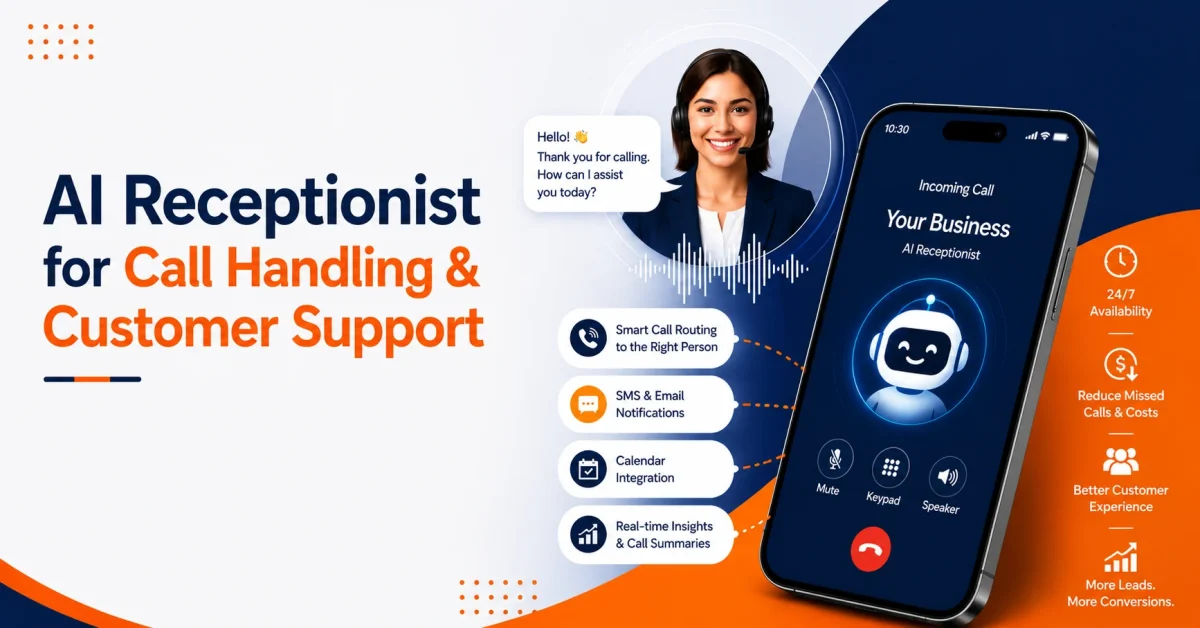

Table of Contents
A missed call can seem harmless at first glance. Maybe it’s just a customer wanting to know prices, a patient trying to reschedule an appointment, a tenant reporting some maintenance issue with the building, or just a buyer who needs a quick callback.
But if your busy team is unable to attend those calls, it can result in lost revenue, a poor customer experience, and a frustrated staff.
That’s where an AI receptionist really comes in handy.
An AI receptionist – or virtual phone system – doesn’t replace the need for real people. It handles the initial front-line stuff, answers the routine calls that don’t need real human interaction, collects the information you need, routes the callers to the right people, and keeps support moving when your team can’t keep up with every phone ringing.
For businesses that rely on speedy responses, consistent service, and customer trust, an AI receptionist can be the difference between a missed call and a booked appointment.
What Is an AI Receptionist?
An AI receptionist is a voice AI receptionist that answers incoming calls and handles basic front desk tasks through natural conversation. It can greet callers, understand why they are calling, ask follow-up questions, capture details, schedule appointments, transfer urgent calls, and send summaries to the right team.
A traditional phone menu asks callers to press numbers. An AI phone receptionist listens to what the caller says and responds based on intent.
For example, a caller may say:
“I need to move my appointment from Friday to Monday.”
A regular menu may not understand that. An AI front desk assistant can identify the request, check the calendar, confirm availability, and update the booking if the system is connected.
In simple terms, an AI receptionist gives your business a front desk that can answer calls, support customers, and manage routine requests around the clock.
Why Businesses Are Moving to AI Call Answering Services
Customers do not like waiting. They also do not like repeating themselves, leaving voicemails, or calling again because nobody answered the first time.
For a business, every missed call can mean:
- A new lead choosing a competitor.
- A customer losing confidence.
- A support issue getting worse.
- A staff member getting interrupted again.
- A booking that never happens.
An AI call answering service helps solve this by keeping the phone covered even when your team is busy, closed, short-staffed, or handling high call volume.
This matters even more for service-based businesses. A plumbing company can miss an emergency job. A dental office can miss a same-day appointment. A law firm can miss a consultation. A real estate team can miss a buyer who is ready to schedule a showing.
The customer usually does not wait. They call the next business.
How Does an AI Receptionist Work?
An AI receptionist works by combining voice recognition, natural language understanding, business rules, and integrations with your existing systems.
Here is what usually happens during a call:
- The caller reaches your business phone number.
- The AI receptionist greets the caller naturally.
- The caller explains the reason for the call.
- The AI identifies the caller’s intent.
- It asks for the right details.
- It answers simple questions or routes the call.
- It books, updates, or logs the request when connected to your tools.
- It sends a summary to the right person or system.
For example, if a customer calls a salon and says, “Do you have any haircut openings tomorrow after 4?” the AI receptionist can check the schedule, suggest open times, confirm the booking, and send a text confirmation.
If the customer says, “I need to speak to someone about a billing issue,” the AI can collect the account details and route the call to the billing team.
The goal is not to sound fancy. The goal is to move the caller forward without delay.
What Can an AI Receptionist Handle?
| Task | How the AI Receptionist Helps |
| Call answering | Greets callers and responds when staff are unavailable |
| Call routing | Directs customers to the right person, team, or department |
| Appointment booking | Schedules, reschedules, or confirms appointments via calendar integration |
| Lead capture | Collects name, phone number, service need, location, and urgency |
| Customer support | Answers common queries about hours, pricing, services, and policies |
| After-hours calls | Handles calls when the office is closed or staff are offline |
| Call summaries | Sends structured call details to the team after each conversation |
| Follow-ups | Triggers SMS or email reminders via connected automation tools |
| Urgent escalation | Transfers high-priority or emergency calls to a live agent |
| Spam filtering | Blocks or filters unwanted and irrelevant calls to reduce noise |
This makes an AI receptionist useful for both call handling and customer support. It keeps the conversation organized from the first hello.
AI Receptionist vs Traditional Receptionist
| Area | Human Receptionist | AI Receptionist |
| Availability | Limited to working hours and staffing | Available 24/7 |
| Call volume | Handles one call at a time | Handles multiple calls simultaneously |
| Routine questions | Answers manually each time | Responds consistently and instantly |
| Appointment booking | Managed manually with calendar access | Automates scheduling when integrated |
| Cost | Salary, training, coverage, benefits | Subscription-based service |
| Complex issues | Better suited for sensitive conversations | Escalates to human agents when needed |
| Follow-up | Manual unless systems are in place | Sends SMS, email, or CRM updates automatically |
A human receptionist brings empathy, judgment, and personal connection. An AI receptionist brings speed, availability, and consistency. The best setup often uses both.
An AI receptionist is not always the right choice for highly emotional or complex conversations. But for repetitive call handling, intake, routing, scheduling, and FAQs, it can remove a lot of pressure from the team.
AI Receptionist vs IVR: What Is the Difference?
Many businesses already use IVR systems, but callers often dislike rigid phone menus.
IVR usually works like this:
“Press 1 for sales. Press 2 for support. Press 3 for billing.”
The caller must fit into the menu.
An AI receptionist works differently. It allows the caller to speak naturally.
A caller can say:
“I am calling because I need help with my invoice.”
The AI understands the intent and routes the caller to billing or collects the required details first.
That difference matters because customers do not think in menu options. They think in problems. A strong voice AI receptionist understands the problem and guides the caller to the next step.
Where AI Receptionists Help the Most
AI receptionists are useful for any business that receives frequent calls, but some industries see the benefit faster.
Healthcare and Dental Offices
Patients call to book appointments, ask about insurance, reschedule visits, or request urgent help. An AI phone receptionist can answer routine questions, confirm appointment details, and route urgent issues to staff.
Home Services
Plumbers, electricians, HVAC companies, cleaners, and contractors often miss calls while on job sites. An AI call answering service can capture service requests, location, urgency, and preferred time.
Law Firms
Potential clients often call when they are stressed or uncertain. An AI front desk assistant can collect basic intake details, identify the case type, and route urgent matters to the right team.
Real Estate
Agents are often in showings, meetings, or on the road. A virtual receptionist AI can answer property questions, capture buyer details, and schedule viewing requests.
Salons, Spas, and Wellness Businesses
Customers call for pricing, availability, services, cancellations, and bookings. AI receptionists can reduce back-and-forth and fill more appointment slots.
SaaS and B2B Companies
Sales and support teams can use AI customer support to qualify inbound calls, answer common product questions, and route serious prospects to sales.
Practical Example: How Much Can Missed Calls Cost?
Here is a simple example.
A local service business misses 15 calls per week. If only 4 of those callers were real prospects and 2 would have booked a $250 service, the business loses $500 per week.
That is about $2,000 per month in missed opportunity.
This does not include repeat business, referrals, or customer lifetime value.
Now imagine the AI receptionist answers those calls after hours, captures details, sends a callback request, and books even half of those opportunities. The return can be visible quickly.
The same idea applies to dental offices, law firms, real estate teams, clinics, agencies, and support-heavy businesses. The value is not just call answering. It is conversion, speed, and follow-through.
How AI Receptionists Improve Customer Support
Customer support teams often spend too much time answering the same questions.
“What are your hours?”
“Can I change my appointment?”
“Where are you located?”
“What is the status of my request?”
“Can someone call me back?”
An AI receptionist can answer many of these questions without pulling staff away from higher-value work.
It also improves the support experience by collecting the right details before escalation. Instead of transferring a caller with no context, the AI can pass along the caller’s name, issue, account number, urgency, and summary.
That means the human agent starts with context instead of asking the customer to repeat everything again.
Good AI customer support should feel helpful, not robotic. The caller should know what is happening, what details are needed, and when a human will step in.
What Makes a Good AI Receptionist?
Not all AI answering services are created equal, and businesses need to look beyond just the promise of “around the clock” coverage to get to the bottom of how a system really works.
A good AI receptionist should have:
Natural Call Handling
It needs to be able to understand everyday speech, not just memorised keywords. Callers should be able to put their problem into their own words without the AI getting confused.
Smart Call Routing
The system should be able to route calls based on what the caller is actually trying to get done, which department they need to talk to, how urgent their issue is, where they are calling from, or even the time of day or their customer type.
Appointment Scheduling
If you’ve got a business that relies on appointments, being able to integrate your calendar is a must. The AI should be able to book, reschedule, cancel or confirm appointments without needing to go back and forth with your customer.
Lead Capture
The AI should be able to collect useful information like a caller’s name, phone number, what service they are looking for, their budget, how quickly they need the service, where they are located, and how urgent their call is.
Human Escalation
The AI should know when to stop and hand the call over to a real person – for example, if the call is emotional, complex, high-stakes or just plain urgent.
CRM Integration
Notes, summaries and lead details should automatically flow into your CRM or customer record.
Custom Scripts and Playbooks
Every business has its own set of rules and procedures. The AI should be able to follow your greeting, tone, service list, escalation rules, booking policies and support process.
Call Summaries
After each call, your team should get a clear summary of what happened and what the next steps are, to make sure follow-ups are never missed.
Security and Access Controls
Recorded calls, customer data and call transcripts should be protected with proper access controls and data retention rules.
How to Set Up an AI Receptionist the Right Way
An AI receptionist is only as good as its setup, and that means getting it configured in a way that makes sense for your business. Don’t just launch it with generic scripts and expect perfect results.
Start with the types of calls your team handles day in and day out.
Step 1: Make a List of Your Most Common Call Reasons
Group your calls into clear categories:
- New appointments
- Existing appointments
- Questions about prices
- Customer support
- Billing problems
- Emergencies
- Sales inquiries
- Calls from vendors
- Wrong number
- Spam calls
Step 2: Write Down Clear Call Flows
Decide what the AI should ask, answer, route or hand off for each type of call. For example, a dental office might want the AI to ask:
- Is this for a new patient or an existing one?
- What is the reason for the visit?
- Is the patient in pain?
- What day and time works best?
- Should a staff member call back?
Step 3: Hook it Up to the Right Tools
An AI receptionist becomes a lot more useful when it is connected to things like:
- Your business phone system
- CRM software
- Calendar
- Helpdesk software
- SMS platform
- Payment or booking tools
- Analytics software for calls
Step 4: Test it with Real Conversations
Don’t just test perfect calls. Test the AI with messy, real-world conversations too.
Try out things like:
- Fast talking
- Background noise
- Unclear requests
- Angry callers
- Urgent requests
- Multiple questions
- Rescheduling requests
- Caller interruptions
Step 5: Review and Keep Improving
Take a listen to your call summaries, check how accurately phone calls are being routed, and update your scripts. AI receptionists only get better when you refine your playbooks and rules.
Mistakes to Avoid With an AI Receptionist
An AI receptionist can help a business, but only when it is used carefully.
Avoid these common mistakes:
- Using generic scripts that do not match the business.
- Letting AI handle sensitive issues without human backup.
- Forgetting to update hours, pricing, services, or policies.
- Not testing after-hours call flows.
- Sending every call to the same person.
- Making callers repeat information after transfer.
- Ignoring call summaries and missed follow-up alerts.
- Using AI without clear consent or call recording policies.
- Choosing a tool that does not connect with your CRM or calendar.
- Treating the AI receptionist as a one-time setup.
The best AI receptionist is not just installed. It is managed, reviewed, and improved.
When Should a Business Use an AI Receptionist?
A business should consider an AI receptionist if calls are becoming hard to manage.
Signs include:
- Customers often reach voicemail.
- Staff are interrupted by routine questions.
- After-hours calls are not captured.
- Appointment scheduling takes too much time.
- Leads are not followed up quickly.
- Call volume changes by season.
- Support teams repeat the same answers daily.
- Customers complain about response times.
- The business cannot justify a full-time receptionist.
- Sales or service calls are getting missed.
For growing teams, an AI receptionist can give structure before call handling becomes chaotic.
How AI Receptionists Support Growth Without Adding Headcount
Hiring more people is not always the first answer. Some teams do need more staff, but many simply need better call coverage and routing.
An AI receptionist helps by handling the repeatable parts of front desk work:
- Greeting callers
- Asking intake questions
- Booking appointments
- Collecting lead details
- Routing calls
- Answering FAQs
- Sending follow-ups
- Logging call summaries
This allows the human team to focus on real conversations, customer care, closing deals, and solving complex issues.
That is the real value. The AI does not just answer calls. It gives staff their time back.
Choosing the Right AI Receptionist
| Question | Why It Matters |
| Can it answer calls 24/7? | Customers may call outside business hours |
| Can it understand natural speech? | Callers should not feel trapped in a phone menu |
| Can it book appointments? | Scheduling is one of the biggest front desk time drains |
| Can it route calls by intent? | Wrong transfers frustrate both customers and staff |
| Can it connect with CRM and calendar tools? | Data should not remain stuck inside call logs |
| Can it escalate urgent calls? | AI should not block emergency or sensitive requests |
| Can scripts be customized? | The AI must match your brand, services, and workflow |
| Does it provide call summaries? | Teams need clear follow-up details after every call |
| Is customer data protected? | Calls often include sensitive personal or business information |
| Can performance be tracked? | Managers need visibility into calls, bookings, and outcomes |
The right AI receptionist should make customer communication easier, not more complicated.
Final Thoughts
An AI receptionist is no longer just a nice add-on for busy businesses. It is becoming a practical way to answer calls faster, support customers better, and reduce pressure on front desk, sales, and support teams.
The best use of an AI phone receptionist is not to remove people from the customer experience. It is to protect the customer experience when people are unavailable, overloaded, or focused on higher-value work.
For businesses that depend on phone calls, speed matters. The first business to answer often wins the customer.
Never Miss Another Business Call Again
Automate your front desk with an AI receptionist that answers calls, books appointments, and captures every opportunity 24/7.
FAQs
1. What is an AI receptionist?
An AI receptionist is a voice-based virtual receptionist that answers business calls, understands caller needs, routes inquiries, books appointments, and captures customer details.
2. How does an AI call answering service help businesses?
An AI call answering service helps businesses reduce missed calls, answer after-hours inquiries, handle routine questions, qualify leads, and route customers to the right team.
3. Can an AI receptionist replace a human receptionist?
An AI receptionist can handle repetitive call tasks, but it works best with human support for complex, sensitive, urgent, or high-value conversations.
4. Is a voice AI receptionist useful for customer support?
Yes. A voice AI receptionist can answer FAQs, collect issue details, route support calls, create summaries, and reduce repetitive workload for customer support teams.
5. Can an AI phone receptionist book appointments?
Yes. When connected to a calendar or scheduling tool, an AI phone receptionist can book, reschedule, confirm, or cancel appointments based on business rules.
6. What is the difference between IVR and an AI receptionist?
IVR uses fixed menu options, while an AI receptionist understands natural speech and responds based on the caller’s intent.
7. Which businesses need a virtual receptionist AI?
Service businesses, healthcare offices, law firms, real estate agencies, salons, SaaS companies, and support-heavy teams can benefit from a virtual receptionist AI.
8. Can an AI receptionist handle after-hours calls?
Yes. An AI receptionist can answer after-hours calls, capture details, book appointments, send messages, and escalate urgent requests when needed.
9. Does an AI front desk assistant integrate with CRM tools?
Many AI front desk assistant tools can connect with CRMs, calendars, helpdesks, SMS platforms, and phone systems to keep customer data organized.
10. How does Vitel Global help with AI receptionists?
Vitel Global helps businesses manage AI call handling, routing, call summaries, and customer communication through a smarter cloud phone system.
Published: June 26th, 2026
Subscribe to Our Latest Updates
Get monthly product and feature updates, the latest industry news, and more!