Cloud Phone System Features for Better Business Calling

Table of Contents
Cloud phone system features shape how a business answers calls, handles missed conversations, routes customers, and keeps teams connected across devices and locations. The difference between a basic phone setup and a stronger one usually comes down to how well features like call routing, voicemail to email, IVR, call forwarding, and other business calling features work in daily use.
For most businesses, this is where the buying decision becomes practical. A phone system is not judged by whether it can make a call. It is judged by what happens when several calls arrive at once, when a caller needs the billing team instead of support, when someone is unavailable, or when a missed voicemail still needs a quick response before the day ends.
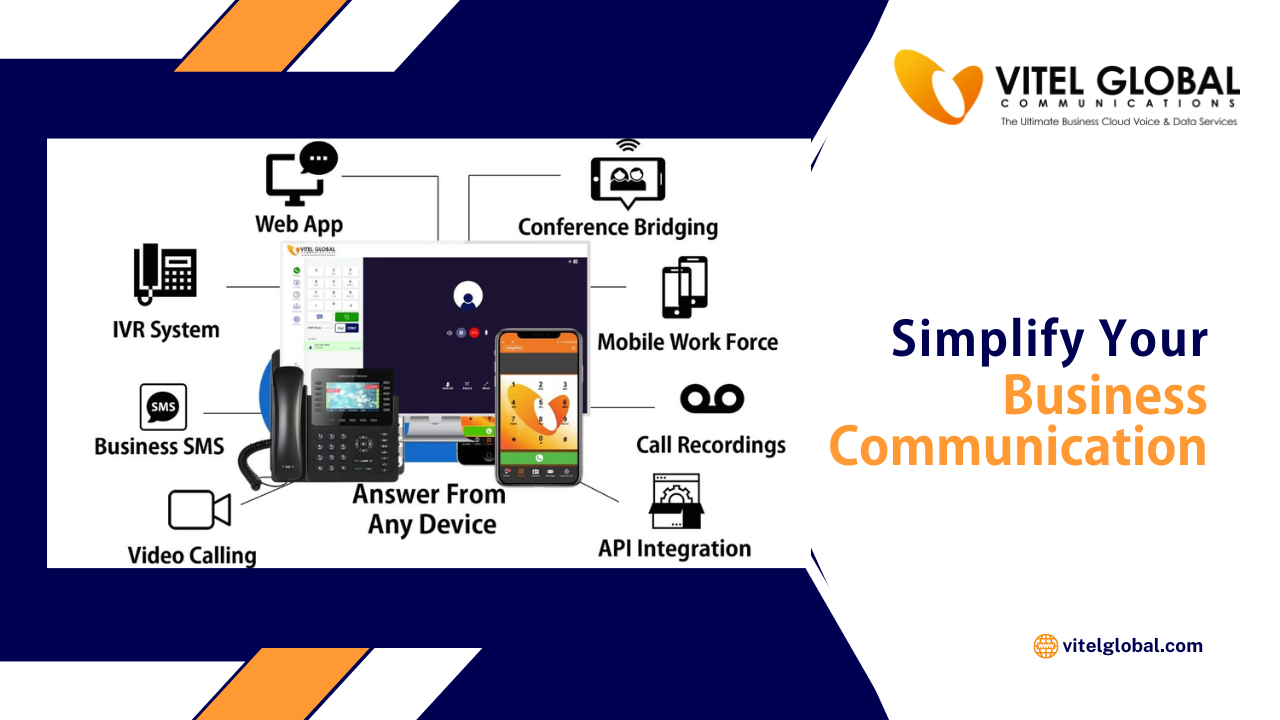
Vitel Global helps businesses move beyond basic calling with cloud phone system features that support multi-level auto attendant, dial-by-name directory, call transfer, call forwarding, voicemail to email, simultaneous ring, mobile and desktop access, CRM click-to-call, and call recording across a broader business communications environment.
Why Cloud Phone System Features Matter More Than Businesses Expect
A basic line can connect two people. That part is simple. The real problem starts after that.
Calls need to move to the right team without making the caller repeat everything. Missed calls need a follow-up path. Managers need visibility. Remote staff need the same access as office staff. Sales, support, operations, and leadership all expect one system to fit the way they work.
This is why cloud phone system features are no longer a nice extra. They sit inside daily business operations. They affect response time, customer patience, team efficiency, and how professional the business sounds from the first greeting onward.
A stronger system usually helps a business do four things better:
- Handle inbound calls without chaos
- Keep employees reachable across devices
- Reduce manual follow-up work
- Create a cleaner communication path across teams
That is also where cloud business calling begins to feel less like a utility and more like an operational advantage.
Cloud Phone System Features That Usually Matter First
When businesses compare providers, they often begin with price or line count. That is understandable, though it rarely gets them to the right answer. The smarter comparison starts with feature behavior.
- How does the system route inbound calls
- What happens when nobody answers
- Can voicemail be checked quickly
- Can calls follow users across desktop and mobile
- Can the front-end experience sound organized without needing a receptionist for every call?
Those questions matter because they point to the features that shape daily performance. The strongest cloud phone system features usually include call routing, voicemail to email, IVR, call forwarding, ring groups, call transfer, mobile and desktop apps, Call recording, reporting, and CRM-linked workflows. Vitel Global includes these capabilities across its business phone and unified communications offerings.
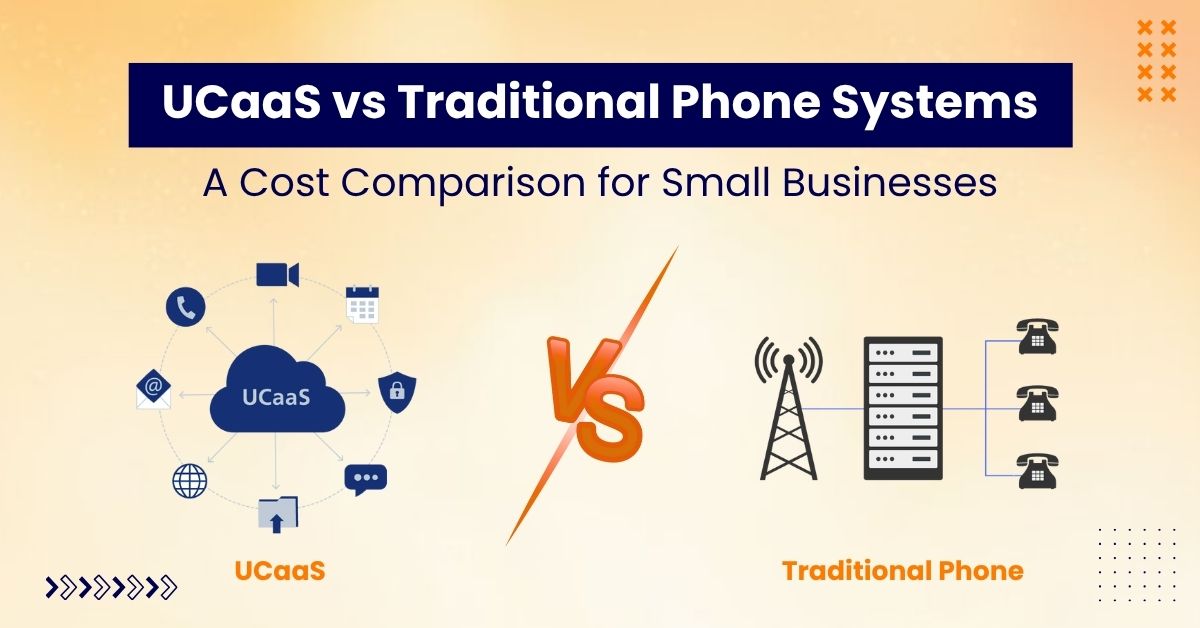
Traditional Phone Setup vs Vitel Global Cloud Phone Features
| Feature Area | Basic or Limited Phone Setup | Vitel Global Cloud Phone Setup |
| Inbound call handling | Calls often ring one line or one person | Multi-level auto attendant, department lines, ring groups, queues, and intelligent call routing support cleaner inbound handling |
| Missed call follow-up | Voicemail may sit in a separate mailbox | Voicemail to email and voicemail transcription help missed calls move into follow-up faster |
| Device access | Often desk-bound | Desktop app, mobile app, call flip, Follow Me, and simultaneous ring support calling across devices |
| AI support | Usually absent | Auto transcriptions, call summaries, and intelligent call routing are highlighted in Vitel Global phone materials |
| Team coverage | Shared coverage is harder to manage | Ring groups, queues, and department logic help teams answer calls together |
| CRM-linked workflows | Calls often stay separate from customer records | CRM integration, click-to-call, screen pop support, and activity visibility help connect calls to workflow actions |
| Visibility and review | Limited reporting | Call recording, real-time usage reports, advanced reports, and analytics improve visibility |
| Business communication scope | Mostly calling only | Calling, team messaging, conferencing, collaboration, and broader UC support sit inside one environment |
Cloud Phone System Features for Call Routing
Call routing is one of the first features a business feels after moving off a basic setup. It decides where inbound calls go, in what order, under what rules, and with what fallback path.
That sounds technical, though the business impact is simple. Better routing reduces wasted time.
If a caller reaches the wrong person, the interaction starts badly. If they wait too long, the business looks disorganized. If they land in a dead end, the opportunity may disappear altogether.
Good call routing gives structure to the call flow. It can move callers by team, department, office hours, availability, location, or priority. It can also connect to queues, ring groups, or direct extensions, depending on how the business is built.
Vitel Global supports multi-level auto attendants, time-based routing, ring groups, call queue behavior, department-level access, direct transfers, and more advanced call handling built for day-to-day business communication.
What better call routing changes in practice
- A law office can direct existing clients and new inquiries to different paths.
- A staffing company can move candidate calls and client calls to separate teams.
- A multi-location business can send callers to the nearest office without changing the public number.
- A growing service business can keep one main number while still routing to billing, support, scheduling, or sales.
That is why call routing sits near the top of the feature list. It improves both customer experience and internal order at the same time.
Upgrade Your Call Routing With Vitel Global
Get cloud phone system features that direct callers faster and reduce missed opportunities.
Cloud Phone System Features for Voicemail to Email
Voicemail still matters, though people do not want to manage it the old way.
Most teams do not have the time to dial in, listen slowly, replay messages, and manually note what needs a response. They want missed call details to move into the places where they already work.
That is why voicemail to email remains one of the most useful cloud phone system features. It shortens the distance between a missed call and a follow-up action. Instead of treating voicemail as a separate box that someone remembers to check later, the system pushes the message into email so it becomes part of the day’s working flow.
Vitel Global lists voicemail to email notification with attachment, voicemail to email access, and remote voicemail access among its core business phone capabilities. Its product content also connects voicemail transcription to productivity and modern cloud phone use.
Why voicemail to email still earns its place
- It helps managers and team members notice missed customer contact sooner.
- It creates a cleaner path for follow-up when staff are mobile.
- It reduces dependence on checking one more separate system.
- It fits businesses where response time matters, but not every call can be answered live.
For lean teams, this matters even more. A missed call does not always mean a lost lead. A missed call with a buried voicemail often does.
Turn Missed Voicemails Into Faster Follow-Up
Use voicemail to email, transcription, and smarter call handling with Vitel Global.
Cloud Phone System Features for IVR
IVR is one of the most visible phone system features because callers hear it almost immediately. When done well, it creates order. When done badly, it creates friction.
The point of IVR is not to sound complicated. It is to help the caller reach the right path faster.
A good IVR menu can guide people to departments, ring groups, specific users, voicemail boxes, or time-based options without making the front desk carry the full weight of inbound traffic. It can also support after-hours handling, holiday routing, and simple self-direction across common caller intents.
Vitel Global describes its multi-level auto attendant as an extended automated phone menu that routes callers to individuals, call queues, or locations based on menu selections. It also includes time-based auto attendant and dial-by-name directory support. The business phone product content references custom IVR, department lines, and advanced call handling as part of the broader business calling setup.
What businesses should want from IVR?
- A short menu structure
- Clear department logic
- Day and after-hours variation
- A route to a real person when needed
- A setup that matches how the business actually works
This is where many businesses make the wrong move. They treat IVR like a checklist item instead of a customer path. The better approach is to build it around actual call reasons.
Cloud Phone System Features for Call Forwarding
Call forwarding remains one of the most practical business calling features because business availability is no longer tied to one desk.
Teams work from offices, homes, client sites, laptops, and mobile devices. Some employees travel. Some rotate shifts. Some split responsibilities across departments. A business phone system that cannot follow that reality starts to feel restrictive very quickly.
Call forwarding helps the business decide what should happen when the original destination cannot answer. Calls can move to another user, another number, another device, or voicemail based on timing, user status, or company rules. That keeps the caller experience more consistent and reduces missed opportunities inside the team.
Vitel Global supports call forwarding, Follow Me behavior, simultaneous ring, mobile access, and answering rules that give businesses stronger control over where conversations land and how quickly they get picked up.
Where call forwarding helps most:
- A business owner can forward calls to a mobile device after leaving the office
- A field service team can keep the business number active while staff work on-site
- A support desk can move unanswered calls to another available person
- A growing company can keep one public-facing number while routing traffic to several internal destinations
For many businesses, that kind of flexibility is what makes a cloud phone setup feel current instead of restrictive.
Cloud Phone System Features for Call Transfer and Call Handling
A phone system also needs to handle live conversations well, not just incoming volume. That is where call transfer, hold behavior, transfer rules, and general call handling features start to matter.
The caller may reach the front desk first and then need billing. A sales inquiry may need a product specialist. A support call may need escalation to a manager. If transfers are slow or messy, the caller feels it immediately.
A stronger call handling setup keeps those movements cleaner. It helps staff transfer calls without confusion, manage hold states professionally, and move conversations to the right person with less friction. This becomes more important as call volume grows or teams spread across departments and locations.
Vitel Global includes call transfer, call waiting, call hold, call park, call pickup, and shared call appearance support, all of which contribute to a more controlled live-call experience.
Cloud Phone System Features for Ring Groups and Team Availability
Many businesses do not want one call to rely on one person. They want a team to be reachable.
That is where ring groups and shared answering logic become useful. Instead of sending an incoming call to one extension and hoping for the best, the system can ring multiple users, pass calls in sequence, or direct traffic through group logic tied to departments or availability.
This is especially useful for support desks, sales teams, scheduling lines, intake desks, and any environment where inbound responsiveness matters more than one fixed endpoint.
Vitel Global supports ring groups, call queues, simultaneous ring, and department-level routing behavior through its broader call management setup.
Why this matters commercially
- A faster answer rate can improve lead handling.
- Shared coverage reduces pressure on one employee.
- Departments can present one number without creating one point of failure.
- Managers can structure answering logic around real workloads.
That is one reason cloud phone system features are often judged by team behavior, not just individual settings.
Cloud Phone System Features for Mobile and Desktop Access
A cloud phone system should not trap the business inside one handset model or one office location. Employees now expect to work from laptops, desk phones, and mobile apps without losing the business number or the core feature set.
That shift changes what buyers should look for. They are not just looking for a calling service. They are looking for continuity across devices.
Mobile and desktop access helps businesses keep internal and external communication moving even when staff are remote, hybrid, or in transit. It also helps companies create a more consistent business identity because employees can still place and receive calls through the business line instead of using personal numbers.
Vitel Global supports a broader set of cloud phone capabilities for businesses that need stronger call handling, user access, and day-to-day communication control.
Cloud Phone System Features for Call Recording and Visibility
Some businesses need a better memory of what happened on calls. Others need a clearer view of patterns. In both cases, call recording and reporting become useful.
Recording can support coaching, dispute review, quality checks, compliance handling, and basic conversation recall. Visibility tools help managers understand missed calls, answered volume, queue behavior, and where communication pressure is building.
Vitel Global includes call recording, reporting, analytics, and connected communication workflows as part of its broader business communications environment.
This is also where the phone system stops being only a front-desk tool and becomes part of business oversight.
Cloud Phone System Features and CRM-Linked Workflows
A phone system becomes more useful when it is not isolated.
If sales teams are working from CRM records or support teams are trying to maintain a cleaner context across conversations, the communication layer should connect with the systems that already hold business information. That shortens follow-up time and reduces manual switching between tabs.
Vitel Global supports click-to-call, screen pop functionality, activity visibility, and CRM connectivity that help businesses keep conversations linked to customer records and follow-up workflows.
For businesses handling high inbound volume or active outbound follow-up, that link can save time every day.
What Businesses Should Actually Look for in Cloud Phone System Features
Many providers list a long set of capabilities. That alone does not mean the system fits the business well. The stronger approach is to judge features by operational use.
A good buying checklist usually sounds more like this:
- Can inbound calls reach the right team without confusion
- Can missed conversations move into email or follow-up flow quickly
- Can the business stay reachable across mobile and desktop devices
- Can departments share responsibility for answer coverage
- Can the business shape a better caller experience without adding more manual work
- Can communication connect to CRM or internal workflows where needed
If the answer is yes across those points, the cloud phone system features are starting to do meaningful work.
How Cloud Phone System Features Change the Customer Experience
Customers may never use the phrase cloud phone system features, though they notice the result.
- They notice when the greeting sounds clear and organized.
- They notice when the system moves them to the right department quickly.
- They notice when voicemail receives a fast callback.
- They notice when they do not have to repeat the same issue three times.
- They notice when the business feels reachable.
That is why feature choice affects more than internal convenience. It affects how reliable the company feels from the outside.
Vitel Global AI Features That Strengthen Daily Call Handling
Some cloud phone features help the business stay organized. AI features help the team move faster after the call begins.
Vitel Global’s business phone material highlights AI-led capabilities such as auto transcriptions, call summaries, and intelligent call routing. Its business phone page also connects these features to advanced call handling, productivity, and cleaner business communication flows.
These capabilities matter in practical ways:
- Auto transcriptions help teams review conversations without depending only on memory or manual notes.
- Call summaries help users understand the key outcome of a call faster, which is useful for sales follow-up, internal handoff, and support continuity.
- Intelligent call routing helps calls move by availability and queue logic instead of relying on manual guesswork.
- The broader Vitel Global phone system also includes voicemail transcription, which helps missed conversations move into follow-up faster.
For businesses comparing providers, this is where the phone system starts doing more than carrying voice traffic. It starts helping teams capture context, reduce missed details, and move conversations forward with less friction.
Integrate AI and Business Calling in One System
Use transcriptions, call summaries, and intelligent routing inside a broader Vitel Global setup.
How Vitel Global Turns Cloud Phone System Features Into Daily Business Value
A long feature list does not help much if the calling experience still feels fragmented. What matters is whether those features work together in a way that helps the business answer faster, route better, and manage communication with less friction.
Vitel Global supports that kind of setup by combining call routing, auto attendant structure, voicemail delivery, mobility, conferencing, CRM integration, business messaging, and broader UC support inside one business communications environment.
That gives businesses a more usable communication flow across day-to-day operations. Incoming calls can land more accurately. Missed calls can move into follow-up faster. Teams can stay reachable across desktop and mobile devices. Departments can handle shared call volume with more structure as the company grows.
For businesses evaluating cloud phone system features, that difference matters. The goal is not to collect more features. The goal is to make communication easier to manage across the business.
Final Thoughts on Cloud Phone System Features
The value of a phone system is not in whether it can make a call. The value is in how it handles the call after that first ring.
That is why cloud phone system features deserve closer attention. Call routing, voicemail to email, IVR, call forwarding, team ring logic, recording, device flexibility, and connected business calling features all shape whether communication feels organized or messy, responsive or delayed, modern or dated.
For businesses that want stronger day-to-day communication without relying on rigid legacy setups, these features are part of the real buying decision. And when those features sit inside a broader system that supports mobility, messaging, conferencing, and CRM-linked workflows, the phone system starts pulling more weight across the business.
Get Cloud Phone System Features That Work Like a Business System
Upgrade to Vitel Global for call routing, voicemail to email, IVR, call forwarding, and connected business calling built for daily use.
Frequently Asked Questions
1. What are the most important cloud phone system features for a small business?
The most useful features usually include call routing, voicemail to email, IVR, call forwarding, mobile access, and ring groups. These help smaller teams stay reachable and manage inbound calls with less manual effort.
2. How does voicemail to email help a business respond faster?
It sends voicemail details into email, so missed call follow-up becomes easier to spot and act on. That helps teams avoid delayed responses and reduces the need to check separate voicemail boxes constantly.
3. What is the difference between IVR and call routing?
IVR is the menu or automated path a caller hears and selects from. Call routing is the broader logic that decides where the call goes based on those selections, schedules, departments, or user rules.
4. Are cloud phone system features useful for remote and hybrid teams?
Yes. Mobile and desktop access, call forwarding, voicemail delivery, conferencing, and shared answering logic help remote and hybrid teams use the same business number and communication setup from multiple locations.
5. Can cloud phone system features connect with CRM platforms?
Many modern business phone systems can connect with CRM tools to support click-to-call, activity visibility, and cleaner workflow tracking. Vitel Global supports this kind of connected communication across calling, customer records, and team workflows.
Published: June 9th, 2026
Tags:
- business call management
- business phone system
- Call Forwarding
- call handling solutions
- Call Routing
- Cloud phone system features
- CRM Integration
- customer call experience
- enterprise communication tools
- hybrid workplace communication
- IVR System
- remote business communication
- unified communications (UCaaS)
- voicemail-to-email
- VoIP Communication
Subscribe to Our Latest Updates
Get monthly product and feature updates, the latest industry news, and more!