



How Hosted PBX Helps Growing Businesses Scale
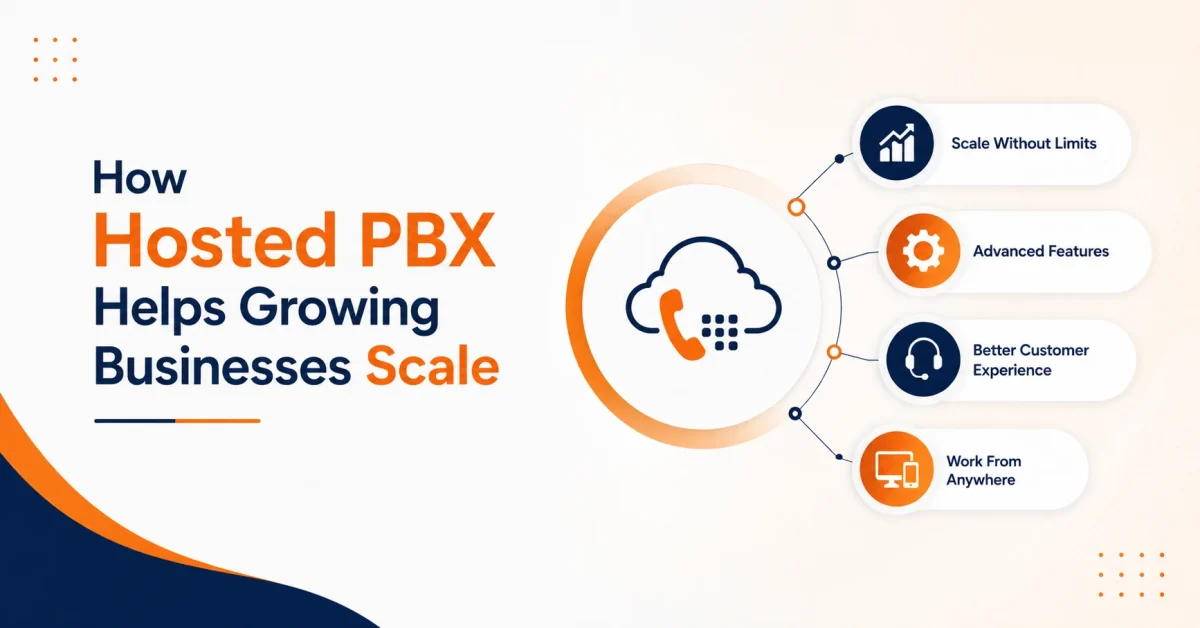

Table of Contents
A rigid phone system can slow business growth. Adding employees may require new lines or hardware, remote teams may struggle to access office extensions, and every new location may operate through separate equipment and call-handling rules.
A hosted PBX removes much of this infrastructure burden by running the business phone system through a service provider’s cloud environment. Companies can add users, configure call flows, support remote employees, and connect multiple locations without installing a separate physical PBX at every office.
For a growing company, the main advantage is not simply internet-based calling. It is gaining a communication system that can adapt as the workforce, call volume, and customer service requirements change.
Why Flexible Business Calling Matters
In March 2026, 22.6% of employed Americans teleworked or worked from home for pay during at least part of their working hours. This continued demand for workplace flexibility means a business phone system must support employees beyond fixed office desks. (U.S. Bureau of Labor Statistics)
Hosted PBX allows office-based, hybrid, traveling, and remote employees to use the same business calling environment across approved phones, computers, and mobile devices.
What Is a Hosted PBX?
A hosted private branch exchange is a business phone system managed outside the company’s premises by a service provider.
Traditional PBX systems generally require businesses to maintain on-site equipment, physical connections, upgrades, licenses, and technical support. A hosted PBX phone system delivers calling services through an internet connection while the provider manages the underlying PBX platform.
Employees can access the system through:
- IP desk phones.
- Desktop applications.
- Mobile applications.
- Web-based calling tools.
- Shared office phones.
- Connected remote-work devices.
Vitel Global’s Cloud PBX supports internet-based calling, call forwarding, mobile access, voicemail, call recording, and multi-location communication.
Why Does a Growing Business Need a Scalable Phone System?
A small business may begin with one main number, a few extensions, and basic voicemail. That setup becomes harder to manage when the company adds employees, departments, branches, remote workers, or higher call volumes.
Effective scalable phone systems should allow a business to:
- Add or remove users without replacing the entire system.
- Create extensions and departments as the organization changes.
- Route calls according to hours, location, or employee availability.
- Support office, hybrid, and fully remote employees.
- Maintain one business identity across multiple locations.
- Activate new capabilities without purchasing separate PBX equipment.
- Review call activity through a centralized administrative portal.
These capabilities allow communication capacity to grow alongside the business instead of becoming an obstacle to expansion.
How Does Hosted PBX Support Business Scalability?
Add Users Without Installing New PBX Hardware
Traditional systems may require additional equipment, telephone lines, technician visits, or available PBX capacity whenever the business expands.
A hosted system allows administrators to add users, extensions, numbers, and compatible devices through the cloud platform. This flexibility is useful for businesses experiencing:
- Seasonal hiring.
- Sales-team expansion.
- New department creation.
- Temporary project staffing.
- Contact center growth.
- Business acquisitions.
- New office openings.
The company can increase or reduce capacity according to current requirements rather than purchasing infrastructure based on uncertain future demand.
Manage Multiple Locations Centrally
Growth can create inconsistent call handling. One location may use different greetings, routing rules, extensions, or voicemail processes from another.
Vitel Global’s multi-site management allows administrators to manage cloud phone users, numbers, settings, and locations from a central system.
Centralized management can help businesses maintain:
- Consistent call-handling standards.
- Shared numbering structures.
- Defined user permissions.
- Standard business-hour settings.
- Central reporting across locations.
- Local administrative control where required.
The company can add another location without creating a completely separate phone environment.
Handle Higher Call Volumes
Advertising campaigns, seasonal demand, product launches, and service disruptions may suddenly increase inbound calls.
A call queue can place incoming callers in a waiting line when representatives are busy. Ring groups can distribute calls to multiple employees simultaneously or in a defined sequence.
Businesses can also configure forwarding, automated attendants, voicemail, and overflow routes rather than directing every call to one employee or extension.
How Does Hosted PBX Support Remote Work?
Hosted PBX allows employees to use their business extensions through connected devices, even when they are away from the main office.
Customers continue calling the company’s published number, while employees can answer through approved desk phones, desktop applications, or mobile devices.
Vitel Global’s call forwarding can redirect calls to other phone numbers or cell phones. Its hot desking feature allows employees to access personal extensions and voicemail from shared workstations.
These capabilities support remote work without requiring employees to publish personal phone numbers or operate outside the company’s communication system.
Which Enterprise Phone Features Can Small Businesses Use?
One of the main benefits of hosted PBX is access to capabilities that once required substantial telecommunications equipment.
Common enterprise phone features for small business include:
Automated Attendant
An automated attendant welcomes callers and directs them to the correct employee, extension, or department.
Call Queues
Queues organize callers when employees are busy and provide a structured waiting experience.
Ring Groups
Ring groups distribute incoming calls across selected employees to improve availability.
Intelligent Call Routing
Calls can follow rules based on business hours, departments, caller choices, locations, or employee availability.
Call Forwarding
Employees can redirect calls when traveling, working remotely, or temporarily unavailable.
Voicemail to Email
Vitel Global’s voicemail-to-email feature can send voicemail audio and notifications to a user’s email inbox.
Call Recording
Authorized calls can be recorded for quality reviews, training, documentation, and applicable compliance needs.
Call Logs and Reporting
Vitel Global’s call logs track details such as call time, duration, caller information, and outcome.
Hosted PBX vs. Traditional PBX
| Area | Traditional On-Site PBX | Hosted PBX |
| Core Infrastructure | Installed at the business location | Managed in the provider’s cloud environment |
| Initial Investment | Equipment, installation, licenses, and maintenance | Subscription, devices, configuration, and connectivity |
| User Expansion | May require equipment upgrades or technician support | Users can be added easily through the platform |
| Maintenance | Managed internally or through external contractors | Core platform managed by the provider |
| Remote Access | May require additional setup and configuration | Built for internet-connected users and remote teams |
| Multiple Locations | Separate systems may require integration | Locations can operate within one unified cloud system |
| Feature Upgrades | Limited by hardware compatibility | Updated regularly through software |
| Business Continuity | Depends on on-site infrastructure reliability | Calls can be redirected across devices and locations |
A traditional PBX may still suit a company with established infrastructure, internal telecommunications expertise, and specialized control requirements. Hosted PBX is generally more flexible for companies that want to scale without maintaining the entire PBX environment themselves.
Cloud PBX vs. SIP Trunking: What Is the Difference?
The cloud PBX vs. SIP trunking decision depends on whether the company wants to replace or retain its existing PBX.
Hosted or cloud PBX moves the phone-system environment to the provider’s platform. The provider manages the main PBX infrastructure, while the business accesses services through the internet.
SIP trunking replaces traditional telephone connectivity with IP-based calling but generally allows a company to keep a compatible on-site PBX.
Vitel Global’s hosted VoIP guide explains how provider-managed hosted calling can support routing, mobile access, messaging, meetings, and CRM-connected communication.
Hosted PBX May Be Better When:
- The company wants to reduce dependence on on-site PBX equipment.
- Employees work across offices and remote locations.
- The business has limited internal telecommunications resources.
- Administrators want centralized cloud management.
- The existing PBX is outdated or approaching replacement.
- Users and locations must be added regularly.
SIP Trunking May Be Better When:
- The existing PBX remains suitable and compatible.
- The company wants to preserve its current equipment.
- Internal teams can manage the PBX.
- The business prefers a phased modernization.
- The immediate priority is replacing traditional phone lines.
Both approaches support growing with VoIP, but they address different infrastructure requirements.
Can Hosted PBX Reduce the Cost of Growth?
Hosted PBX does not eliminate communication costs. Businesses still pay for subscriptions, connectivity, devices, numbers, implementation, and optional services.
However, it may reduce the need for:
- Separate PBX equipment at every location.
- Large upfront infrastructure purchases.
- Dedicated spaces for telephone equipment.
- Technician visits for routine user changes.
- Separate calling tools for remote employees.
- Early investment in unused capacity.
Businesses should compare the total cost of ownership rather than subscription price alone.
Total phone-system cost = platform fees + devices + connectivity + maintenance + administration + upgrades + expansion costs
Vitel Global’s plans and pricing include business calling, number porting, call forwarding, voicemail, mobile and desktop applications, call recording, and virtual receptionist options, depending on the selected plan.
Can a Business Keep Its Existing Phone Numbers?
Changing a known business number can disrupt customers and marketing. The number may already appear on websites, directories, advertisements, business cards, and customer records.
Vitel Global’s number porting service allows eligible numbers to move to the cloud phone environment. Temporary numbers may also be available during the transition.
Businesses should confirm eligibility, documentation, expected timelines, and continuity arrangements before canceling an existing service.
How Can Hosted PBX Improve Customer Experience?
Scalability should not focus only on adding users. A growing phone system must also protect customer experience as call volume and organizational complexity increase.
Hosted PBX can help by:
- Connecting callers with the correct department.
- Reducing unnecessary transfers.
- Providing consistent greetings across locations.
- Offering queue announcements during busy periods.
- Routing calls to available remote employees.
- Delivering voicemail notifications promptly.
- Supporting after-hours and overflow workflows.
- Giving managers visibility into unanswered calls.
A properly configured system helps the business expand without making communication more difficult for customers.
What Should a Business Evaluate Before Moving to Hosted PBX?
Network Readiness
Call quality depends on bandwidth, latency, jitter, packet loss, Wi-Fi conditions, routers, firewalls, and Quality of Service settings.
Microsoft identifies UDP latency, UDP jitter, and UDP packet loss as important measures of real-time call quality. Its Call Quality Dashboard guidance considers average jitter above 30 milliseconds a poor-stream condition. These are useful technical references, but each provider may have different network requirements. (Microsoft)
The business should also evaluate backup internet connectivity for locations where continuous calling is critical.
Emergency Calling
Businesses should evaluate how the phone system supports 911 calls across offices, shared spaces, remote locations, and hot desks.
Kari’s Law requires applicable multi-line telephone systems to support direct 911 dialing without an additional access prefix. FCC rules implementing RAY BAUM’S Act address dispatchable-location information, which can include details such as a building, floor, suite, or room. (FCC)
The business should confirm:
- How 911 calls are dialed.
- Who receives emergency-call notifications.
- How locations are assigned to users.
- How remote-worker locations are updated.
- Which responsibilities belong to the provider and customer.
Existing Call Workflows
Before migration, the business should document:
- Main numbers and direct numbers.
- Extensions and shared lines.
- Departments, branches, and remote users.
- Business-hours and after-hours routing.
- Automated attendant menus.
- Queues, ring groups, and overflow routes.
- Voicemail and notification rules.
- Recording and reporting requirements.
- CRM and business application integrations.
This prevents inefficient legacy processes from being copied into the new system.
Migration Plan
The business should:
- Identify numbers that need to be transferred.
- Confirm number-porting documents and timelines.
- Define administrator and employee permissions.
- Select phones and applications for each user.
- Configure routing, queues, voicemail, and after-hours rules.
- Test inbound, outbound, internal, transferred, and emergency calls.
- Train employees before the transition.
- Monitor call quality and routing after launch.
Larger businesses may begin with one department or location before completing a full rollout.
How Can a Business Measure Hosted PBX Performance?
A company should record baseline performance before migration and compare it with the same indicators afterward.
| Metric | What It Measures |
| New-User Activation Time | How quickly the system supports onboarding or hiring |
| Call Answer Rate | How many inbound calls successfully reach employees |
| Missed-Call Rate | How often incoming calls go unanswered |
| Average Answer Time | How quickly callers are connected to a representative |
| Call Abandonment Rate | How often callers leave before being answered |
| Transfer Rate | Whether calls are routed to the correct team efficiently |
| Administration Time | Internal effort required to manage and maintain the system |
| Call-Quality Issues | Frequency of audio, latency, or connection problems |
| Service Interruptions | Reliability and uptime of the calling system |
| Cost per User | Whether costs remain sustainable as the business scales |
Using internal baselines avoids unsupported claims and gives the business a factual way to evaluate scalability.
Scale Your Business Communication with Confidence
Upgrade to a hosted PBX system that grows with your team, locations, and customer demands.
Frequently Asked Questions
1. Is hosted PBX suitable for small businesses?
Yes. A small business can begin with essential users and calling features, then add extensions, departments, phone numbers, locations, and advanced capabilities as it grows.
2. Does hosted PBX require desk phones?
Not necessarily. Employees may use compatible IP desk phones, desktop applications, web-based calling tools, mobile applications, or a combination of devices.
3. Can hosted PBX support multiple offices and remote employees?
Yes. Hosted PBX can connect office, hybrid, traveling, and remote employees through one business calling environment while allowing administrators to manage users, numbers, and routing centrally.
4. How does Vitel Global help growing businesses scale with hosted PBX?
Vitel Global provides a hosted PBX phone system that supports user expansion, call routing, mobile access, voicemail, call recording, and centralized management. Businesses can add users and locations without installing a separate physical PBX at every office.
5. Can Vitel Global support multiple locations through one phone system?
Yes. Vitel Global’s multi-site management allows businesses to manage users, phone numbers, settings, and locations through a centralized platform while maintaining location-specific call workflows where required.
6. Can a business keep its existing phone numbers when moving to Vitel Global?
Eligible business numbers can be transferred through Vitel Global’s number-porting service. Businesses should confirm number eligibility, documentation requirements, and transfer timelines before canceling their existing service.
7. What happens to hosted PBX during an internet outage?
A local internet outage may affect connected desk phones and applications. Backup internet connectivity, mobile applications, call forwarding, and alternate locations can help reduce disruption.
8. Is hosted PBX secure?
Security depends on both the provider and the business. Companies should evaluate encryption, authentication, user permissions, fraud controls, system monitoring, software updates, and incident-response procedures.
Published: July 16th, 2026
Subscribe to Our Latest Updates
Get monthly product and feature updates, the latest industry news, and more!